
How to Track PIC, Dual, Night and Cross Country Hours in a Pilot Logbook
Tracking PIC, dual, night and cross-country hours is one of the most important parts of managing your pilot logbook. For New Zealand pilots, these hours are more than simple numbers. They help show your training progress, licence experience, aircraft exposure, recency, currency, and readiness for future flying opportunities.
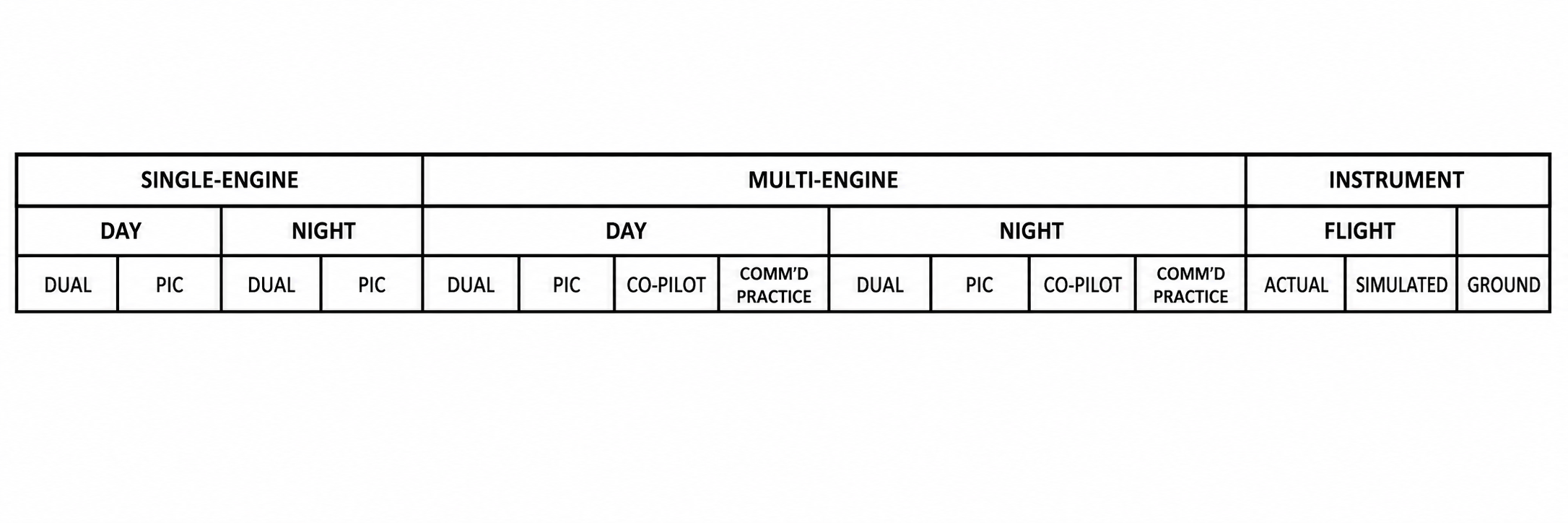
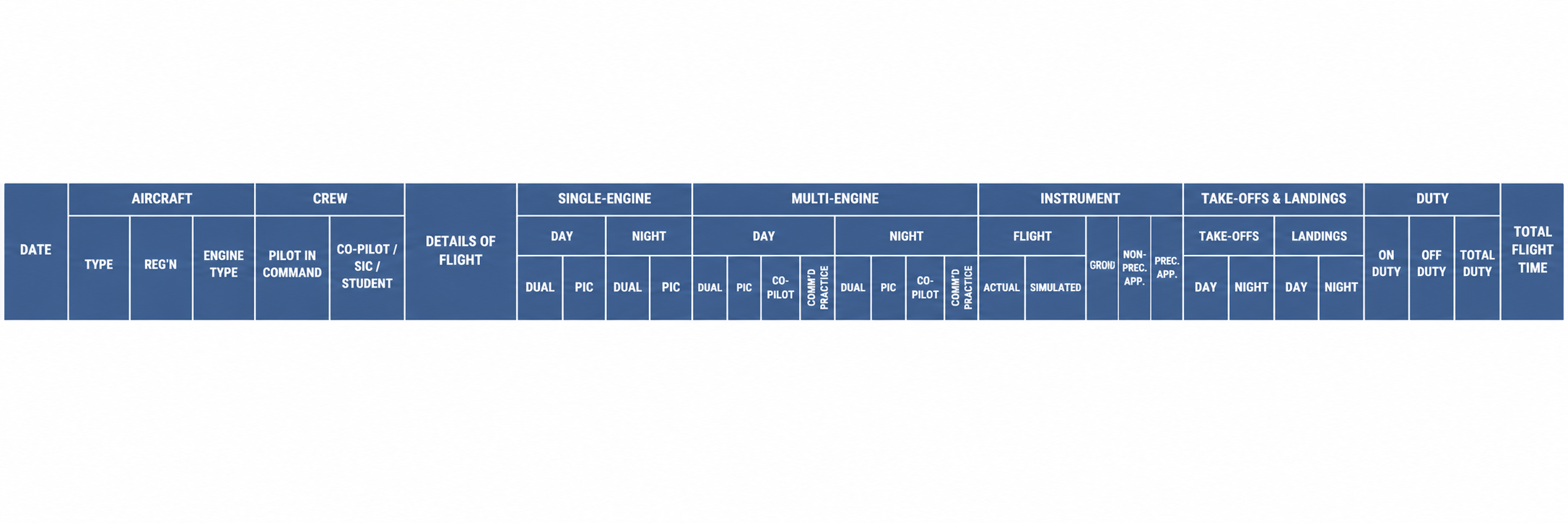
A traditional paper logbook gives pilots a structured way to record flight time. It includes columns for different types of flying, including single-engine, multi-engine, day, night, pilot-in-command, dual, and instrument time. These columns are useful because pilots can manually total each page and keep a running record of their experience.
However, a paper logbook has limitations.
The biggest challenge is that the information is locked into fixed columns and handwritten entries. You can see totals on a page, but it is much harder to analyse the data in detail.
For example, a pilot may want to know:
How many PIC hours have I flown on a specific aircraft?
How much dual time did I complete with a specific instructor?
How much night time have I logged in the last 12 months?
How many hours have I flown in one aircraft type?
How many cross-country flights have I completed?
How much cross-country PIC time do I have?
How many of my hours were linked to a specific flight school or organisation?
How much of my flying experience is useful for a job application?
These questions are difficult to answer quickly from a physical logbook because the data was not built to be filtered, searched, graphed, or turned into reports.
PIC Hours
PIC means Pilot-in-Command. These are the hours where the pilot is acting as the person responsible for the operation and safety of the flight.
In a paper logbook, PIC time is usually recorded in the relevant PIC column depending on whether the flight was single-engine, multi-engine, day, night, or another category. This makes it possible to manually total PIC time across a page or logbook section.
The challenge is that paper logbooks do not make it easy to break PIC time down further.
For example, you may know your total PIC hours, but not instantly know how many PIC hours were flown:
On a specific aircraft registration
On a specific aircraft type
During a specific date range
At night
As cross-country flights
With a specific person onboard
For a specific operation, training phase, or employer requirement
With NZAviator, PIC time becomes structured data. That means it can be filtered, grouped, searched, and reported. Instead of only seeing a total number, pilots can understand exactly where those hours came from.
Dual Hours
Dual hours are usually logged when a pilot is receiving instruction from a qualified instructor.
In a physical logbook, dual time is recorded in the correct dual column. This helps pilots and instructors keep track of training hours and licence progression. The problem is that once the flight is written into the logbook, the information is not easy to analyse beyond the visible page totals.
For example, if you want to know how much dual time you completed with one instructor, across multiple aircraft, over a certain training period, a paper logbook makes that difficult. You may need to manually review every relevant flight, check the instructor name, check the aircraft, and calculate totals by hand.
With NZAviator, dual time can be connected to people, aircraft, aircraft type, date range, and training records. This makes it easier to see not just how much dual time you have, but who it was with, when it happened, what aircraft it was in, and how it fits into your wider flying history.
Night Hours
Night flying is another important category of flight time. In a CAA-style paper logbook, night time can be recorded in the relevant night columns, including night dual or night PIC where applicable.
This is useful for basic record keeping, but still limited when a pilot wants detailed reporting.
For example, a pilot may want to know:
Total night PIC hours
Total night dual hours
Night hours in the last 90 days
Night take-offs and landings
Night time by aircraft type
Night flying linked to a specific training phase
Night experience for employment or licence progression
In a paper logbook, this information may exist, but it is not instantly available. It usually requires manual checking and calculation.
With NZAviator, night flying can be tracked and displayed through summaries, tables, charts, and reports. This helps pilots see their night experience more clearly and prepare better information for instructors, flight schools, and future employers.
Cross-Country Hours
Cross-country tracking is one of the biggest limitations of a traditional paper logbook.
In many physical logbooks, there is no dedicated cross-country column. Pilots often record cross-country details in the “Details of Flight” or Custom Column, using notes, route entries, or descriptions to show that the flight was cross-country.
That creates a problem.
If cross-country time is written only as text or route detail, it becomes very difficult to calculate accurate cross-country totals later. A pilot may be able to see individual flights, but not instantly know total cross-country hours, PIC cross-country hours, dual cross-country hours, cross-country hours by aircraft type, or cross-country flights within a date range.
This matters because cross-country experience can be important for training, licence progression, flight tests, and career planning.
NZAviator App solves this by allowing cross-country information to be treated as structured logbook data, not just written text. Pilots can mark and manage cross-country flights, connect them with route and waypoint data, and generate better summaries later.
Instead of searching through handwritten details, pilots can use the app to understand their cross-country experience more clearly.
Why Paper Logbooks Are Limited for Advanced Reporting
Paper logbooks are good for official record keeping, but they are not designed for modern data analysis.
CAA rules require pilots to keep accurate logbook records, and before submitting a logbook to the Director, pilots must total each column, enter total flight experience, and certify the correctness of entries.
That works for page totals and official record keeping, but it does not solve the deeper reporting problem.
A paper logbook cannot instantly filter by:
Aircraft registration
Aircraft type
Instructor
Co-pilot
Student
Organisation
Flight type
Date range
PIC time
Dual time
Night time
Instrument time
Cross-country time
Take-offs and landings
Currency status
Training progress
Employment requirements
That is why many pilots end up using spreadsheets, calculators, manual notes, or separate documents to understand their own flying history.
How NZAviator Helps Pilots Track These Hours
NZAviator is designed to help New Zealand pilots turn flight entries into useful aviation data.
Instead of only recording a flight as a row in a logbook, NZAviator allows flight data to connect with other parts of the pilot’s aviation profile.
This means pilots can track and analyse:
PIC hours
Dual hours
Night hours
Instrument hours
Cross-country hours
Aircraft type totals
Aircraft registration totals
People connected to flights
Instructor history
Training progress
Take-offs and landings
Currency status
Endorsements and authorisations
Reports and exports
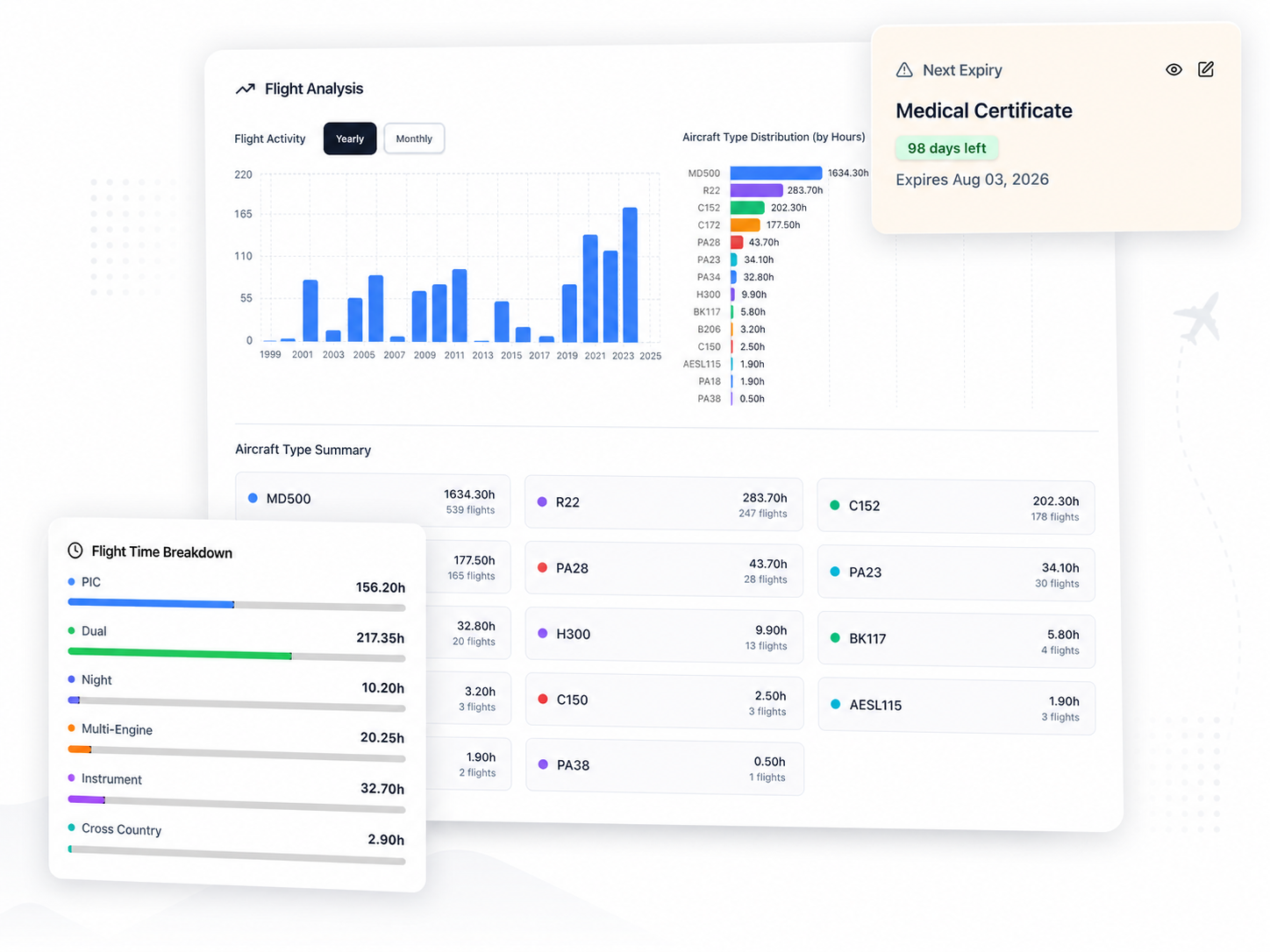
The benefit is that pilots are not limited to static page totals. They can view their data in tables, graphs, charts, summaries, and reports.
For example, instead of manually calculating how much PIC time was flown on a specific aircraft, a pilot can use structured data to generate a clearer view.
Instead of guessing how much dual time was completed with one instructor, the People section can help show relationships between pilots, instructors, students, and organisations.
Instead of searching through text to find cross-country flights, pilots can manage cross-country as a trackable field and use it in reporting.
Better Reports for Training and Career Progression
The real value of tracking PIC, dual, night and cross-country hours digitally is not just convenience.
It helps pilots present their experience properly.
A pilot preparing for a flight test, instructor review, job application, airline interview, or employer conversation may need more than a handwritten total. They may need clean evidence of their experience.
NZAviator is being built to help pilots generate better reports from their own flight data. That includes visual summaries, aircraft breakdowns, time category totals, currency information, and career-ready reporting.
This is especially useful for pilots who want to understand their progress and eventually present their flight experience in a more professional way.
Paper Logbook vs Digital Tracking
A paper logbook records the flight.
A digital logbook helps explain the data behind the flight.
A paper logbook can show total PIC or dual hours if the columns have been manually calculated.
A digital logbook can show where those hours came from, which aircraft they were flown in, who they were flown with, when they happened, and how they relate to future requirements.
A paper logbook may include cross-country details as text.
A digital logbook can make cross-country flights searchable, filterable, and reportable.
Both have value, but they serve different purposes.
For New Zealand pilots, the safest approach is to keep official logbook requirements in mind while using digital tools to improve tracking, reporting, and backup. CAA now provides for approved electronic logbook software under Rule 61.29(h), where the Director is satisfied the software gives equivalent assurance for matters such as entry format, certification, record retention, alterations, and submission requirements.
Final Answer: The Best Way to Track PIC, Dual, Night and Cross-Country Hours
The best way to track PIC, dual, night and cross-country hours is to record the flight correctly at the time, then manage the data in a system that can calculate, filter, analyse, and report it properly.
A CAA paper logbook is important for official record keeping, but it is limited when pilots need deeper insights.
NZAviator helps solve this by turning logbook entries into structured aviation data. Pilots can track PIC, dual, night and cross-country hours, connect flights to aircraft and people, view charts and summaries, and generate cleaner reports for training, currency, and career progression.
For New Zealand pilots, this means your logbook becomes more than a record of flights.
It becomes a useful aviation data system.
FAQ
What are PIC hours?
PIC hours are Pilot-in-Command hours. They record time where the pilot is acting as the person responsible for the flight.
What are dual hours?
Dual hours are usually recorded when a pilot is receiving flight instruction from a qualified instructor.
How do pilots track night hours?
Night hours are usually entered into the relevant night flying columns in the logbook, such as night dual or night PIC. In NZAviator, night time can also be analysed through digital summaries, charts, and reports.
Why is cross-country time hard to track in a paper logbook?
Cross-country time is often recorded in the route or details section rather than in a dedicated total column. This makes it difficult to calculate total cross-country hours later without manually checking individual flights.
Can NZAviator track cross-country hours?
Yes. NZAviator allows pilots to manage cross-country information as structured data so it can be used in summaries, filters, and reports.
Why use NZAviator instead of only a paper logbook?
The CAA paper logbook remains the required official record for most New Zealand pilots unless they are using electronic logbook software approved under CAA Rule 61.29. NZAviator is not intended to remove that responsibility. Instead, it gives pilots a cleaner digital layer for understanding their flight data — showing totals, aircraft breakdowns, people relationships, currency, graphs, summaries, and reports in a format that is far easier to analyse than a paper logbook alone.
James M.
Airline Pilot
April, 2026
Brilliant support
I’ve been using the app for the last month and loving it. As an airline pilot, I suggested a few features to better support airline flying and the team quickly made them live. Excellent service, fast improvements, and a platform I’d happily recommend to my colleagues. Well done!
Kayden H.
April, 2026
A top-notch, user-friendly aviation tool for NZ pilots. Highly recommend!
NZAviator has been a huge help while working toward my PPL. The website offers a variety of free tools that have assisted me throughout my training. Both the app and site are very user-friendly, the staff are always willing to help. The free digital logbook has been excellent in tracking experience.
Lucy W.
Flight Instructor
April, 2026
Absolutely the best digital logbook
After struggling with my old excel logbook, I tried NZAviator App and was impressed straight away. Support was fast, and with over 800 hours in my logbook, the team uploaded everything for me within a few days. The process was smooth and the app has been easy to use since.